
Getting your website into Bing starts with giving the search engine a reliable way to discover your pages. If you want to submit to Bing search engine results, the primary tools are Bing Webmaster Tools, an XML sitemap, individual URL submission, and IndexNow.
The process itself isn’t difficult. But submission and indexing are two different things.
Bing Webmaster Tools: A free Microsoft platform website owners can use to submit, inspect, and monitor their sites in Bing Search.
Here’s how to approach it.
How Do I Submit My Website to Bing?
The simplest way to submit a website to Bing is to add it to Bing Webmaster Tools, verify ownership, and make sure Bing has access to your XML sitemap. If you already use Google Search Console, Bing can make the setup even easier by importing your verified property.
Microsoft currently provides two primary ways to add a website to Bing Webmaster Tools: import it from Google Search Console or add it manually. Bing’s documentation says importing can bring over the verified property and its associated sitemaps.
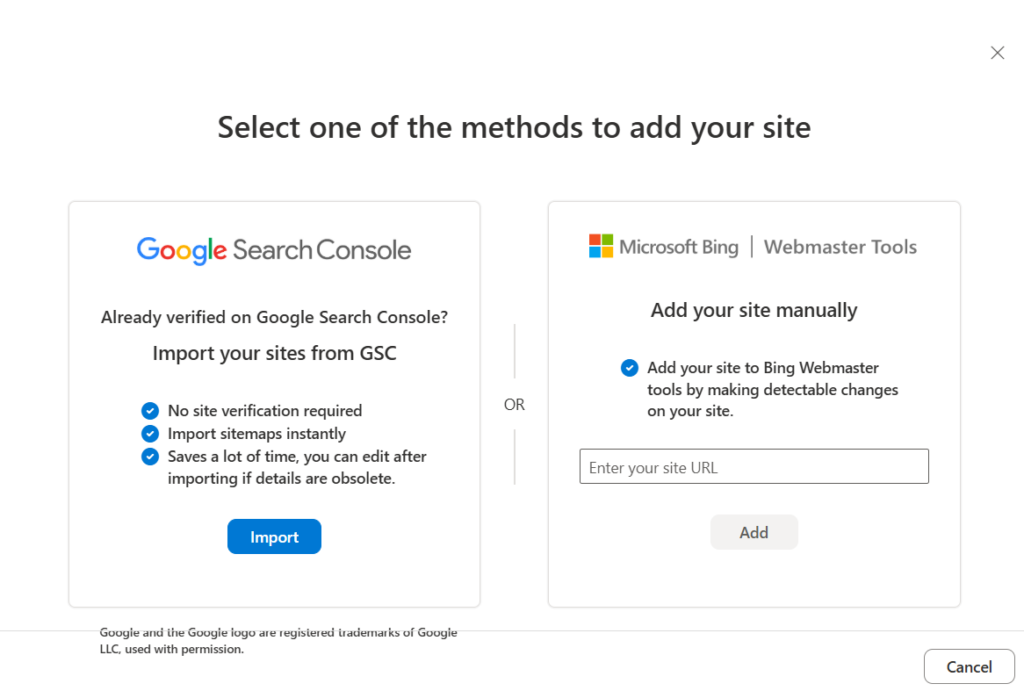
Option 1: Import Your Website From Google Search Console
Already using Google Search Console? Start here.
Sign in to Bing Webmaster Tools and choose the option to import sites from Google Search Console. After authorizing access, select the verified website you want to bring into Bing.
The advantage is straightforward. Bing can use the existing Search Console verification rather than requiring you to prove ownership again. Bing also states that sitemaps associated with the imported Search Console property can be brought over during this process.
This makes the Google Search Console import a practical option for businesses that already have their Google SEO foundation in place.
Option 2: Add and Verify Your Website Manually
If you aren’t using Google Search Console, add your site’s URL directly to Bing Webmaster Tools and complete Bing’s ownership verification process.
Once Bing recognizes you as an authorized site owner, you can access its indexing, sitemap, URL inspection, search performance, backlink, and other webmaster reports.
Verification matters because Bing Webmaster Tools isn’t simply a submission form. It becomes a diagnostic resource for understanding how Bing sees your website.
How Do I Submit an Individual URL to Bing?
Submit your XML sitemap through the Sitemaps section of Bing Webmaster Tools. A sitemap gives Bing a structured source for discovering important URLs across your website instead of relying solely on links or individual URL submissions.
XML sitemap: A file that provides search engines with a structured list of URLs you want them to discover and crawl.
According to Microsoft’s sitemap documentation, Bing accepts XML sitemaps as well as RSS 2.0, Atom 0.3 and 1.0 feeds, and text files containing one URL per line.
Once your site is verified:
- Open the website in Bing Webmaster Tools.
- Select Sitemaps.
- Click Submit sitemap.
- Enter the full URL of your sitemap.
- Submit it and monitor its processing status.
If you imported your site from Google Search Console, check the Sitemaps section first. Your existing sitemap may already be there.
A sitemap helps Bing discover your website at scale. It does not guarantee that every URL in the file will ultimately appear in search results.
How Do I Submit a Sitemap to Bing?
Use Bing’s URL Submission tool when you want to notify Bing about a specific new or updated page. This is useful after publishing an important service page, article, landing page, or meaningful content update.
Go to your verified property in Bing Webmaster Tools, open URL Submission, enter the URL, and submit it.
Bing currently allows manual submission of up to 10,000 URLs per domain per day, with the quota resetting at midnight UTC. The system retains the most recent 1,000 submitted URLs in submission history. Microsoft also notes that repeatedly submitting the same URL does not make indexing happen faster.
That last point matters.
If you submitted a page and Bing still isn’t indexing it, don’t assume another submission will solve the problem. Inspect the page instead.

What Is IndexNow and Should You Use It?
IndexNow allows a website to automatically notify participating search engines when a URL is added, changed, or deleted. For websites that publish or update content regularly, this can reduce reliance on waiting for a crawler to discover those changes on its own.
IndexNow: An open protocol that lets websites notify participating search engines when content has been created, updated, or removed.
Microsoft now strongly recommends IndexNow as its preferred automated submission method. Microsoft says it can notify Bing and other participating search engines and is already integrated with many content management systems and content delivery platforms.
That changes how we recommend thinking about Bing submission.
Your sitemap remains valuable because it provides Bing with an organized view of the URLs on your site. Manual submission remains useful for individual URLs. But for an actively maintained website, IndexNow can create a more direct connection between publishing changes and notifying search engines about them.
For businesses managing SEO over the long term, automation is usually more dependable than remembering to manually submit every important update.
Does Submitting a Website to Bing Guarantee Indexing?
No. Submitting a website or URL tells Bing about the content, but Bing decides whether the page belongs in its search index.
Microsoft states directly that it does not guarantee every submitted URL will be indexed.
This distinction is easy to miss:
Submission → Discovery → Crawling → Indexing
A successful submission means you have provided Bing with the URL. It doesn’t prove that Bing crawled it, indexed it, or will rank it for a particular search.
There also isn’t one universal indexing timeframe. Crawl accessibility, page quality, internal linking, directives, canonicalization, and other technical signals can affect what happens after discovery.
So if a page isn’t appearing, investigate why.
Don’t just submit it again.
What Should You Do If Bing Still Isn't Indexing Your Page?
Use Bing’s URL Inspection tool to determine where the process is failing. It can report whether Bing discovered, crawled, and indexed the URL while also identifying certain SEO, HTTP, and markup issues.
According to Microsoft’s URL Inspection documentation, the tool provides index, SEO, and markup information and includes a Live URL option that shows what Bingbot can retrieve from the page.
Start by checking:
- Whether Bing can crawl the URL
- Whether the page returns the correct HTTP response
- Whether the page contains a noindex directive
- Whether Bing recognizes the intended canonical URL
- Whether the URL has known crawl or SEO issues
- Whether important pages have useful internal links pointing to them
Bing’s Site Explorer can provide another level of diagnosis. It includes filters for indexed URLs, server errors, dead links, robots.txt restrictions, noindex pages, redirects, canonical sources, malware, and URLs that Bing selected but hasn’t crawled yet. Microsoft documents those filters here.
That information is more valuable than repeatedly pressing Submit.
Make Bing Submission Part of Your SEO Process
Submitting a website to Bing should be part of your technical SEO setup, not a one-time shortcut to rankings. Give Bing clear discovery paths through Webmaster Tools and your sitemap, use individual URL submission when it makes sense, and consider IndexNow for ongoing content changes.
Then monitor what happens.
Search visibility depends on much more than whether a search engine knows a URL exists. Technical accessibility, useful content, site structure, internal linking, authority, and relevance still matter after submission.
If you want to submit to Bing search engine results successfully, focus on both sides of the equation: help Bing discover your pages, then make those pages worth crawling, indexing, and showing to searchers.
Frequently Asked Questions About Indexing Your Website with Bing
Do I need a Microsoft account to use Bing Webmaster Tools?
Bing Webmaster Tools supports several sign-in options, so website owners do not necessarily need to create a separate Microsoft identity solely for site management. The account still needs authorized access to the applicable Bing Webmaster Tools property.
Can Bing find my website without a submitted sitemap?
Yes. Bingbot can discover URLs through crawlable links even when you haven’t manually submitted a sitemap. A sitemap gives Bing an additional structured discovery source, which is particularly useful for larger sites and URLs that are harder for crawlers to find.
Should staging or development websites be submitted to Bing?
Generally, no. Development environments that are not intended for public search should use appropriate access controls and indexing directives rather than being submitted for discovery. Confirm those protections before launching the production site.
Should images be included in a website's sitemap?
Do redirects need to stay in a sitemap?
A sitemap should generally contain the preferred canonical URLs that return successful responses rather than old URLs that redirect elsewhere. Keeping the sitemap aligned with the site’s current URL structure gives search engines a cleaner source for discovering the pages you actually want crawled and indexed.